How to Play Arrow Escape: 9 Arrow Puzzle Tips That Actually Work
By PlayNeon Team · Published · Last updated: · 2 min read
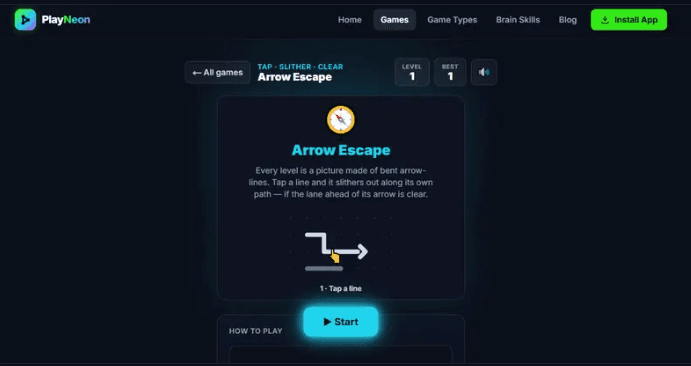
Arrow Escape, in one paragraph
Arrow Escape is a free browser puzzle game where every board is a picture — a heart, a cat, a butterfly — drawn entirely out of bent arrow-lines. You clear the board by tapping lines one at a time, and a line only leaves if the straight lane ahead of its arrowhead is clear all the way to the edge. There is no timer, no move limit and no download. The whole puzzle is figuring out the order.
That one rule is doing all the work, and most people miss it on their first few boards. They tap a line, it wobbles and stays put, and they assume the game is being fussy. It isn't. It's telling you something: the lane is blocked, clear the blocker first.
Below are the nine tips that take you from tapping hopefully to reading a board on sight. You can play Arrow Escape free in your browser in another tab and try each one as you go.
The short version
- Only the arrowhead matters — the tail and the bends are just the body following along.
- Trace the lane to the edge before you tap, not after.
- Clear from the outside in. Edge lines are almost always free.
- When you stall, look for the bottleneck — the one line blocking several others.
- Every board is solvable, so being stuck is a reading problem, not a luck problem.
Why arrow puzzles feel harder than they look
An arrow puzzle looks like a picture. Your brain reads it as a picture — a cat, an anchor — and pictures are things you take in all at once. But the puzzle isn't spatial in that sense. It's sequential. You're not asked where the pieces go, you're asked in what order they can leave.
That mismatch is the whole difficulty. You're looking at a shape and being asked a question about a queue. The nine tips below are really nine ways of forcing yourself to stop seeing the cat and start seeing the traffic.
9 tips for clearing any Arrow Escape board
1. Read the arrowhead, ignore everything else
Each line has exactly one arrowhead, and that head points the only direction the line can travel. The tail, the bends, the length — none of it changes where the line is going. The body just threads along behind the head like a train on its own track.
Beginners scan the whole shape of a line and try to judge whether it "fits" through a gap. Skip that. Put your eye on the arrowhead and look in a straight line from there to the edge of the board. That's the only question.
2. Trace the lane before you tap, not after
This is the single habit that separates a five-minute board from a forty-second one. Before every tap, run your eye from the arrowhead outward in a straight line to the board edge. If anything crosses that lane — any part of any other line, even a corner of it — the tap will fail.
It takes about two seconds. It saves you every wasted tap you were about to make.
3. Clear from the outside in
Lines near the edge have short lanes, which means fewer things can block them. Lines in the middle have long lanes crossing the busiest part of the board.
So sweep the perimeter first. Every edge line you clear shortens and opens the lanes for the ones behind it. Boards that look impossible at the start often unravel on their own once you've stripped two or three rings off the outside.
4. When you stall, hunt the bottleneck
Sooner or later you'll hit a board where nothing on the edge is free. That's the moment to change what you're looking for.
Stop asking "which line can leave?" and start asking "which line is blocking the most other lines?" Find the one piece sitting across three or four lanes at once. Freeing that single line usually triggers a chain — suddenly four lines can move, and the board opens up.
5. Work backwards from the jam
If you can't spot the bottleneck by eye, invert the problem. Pick any line you want to remove, trace its lane, and identify what's in the way. Now that blocker is your new target. Trace its lane. Find its blocker.
Three or four steps down that chain you'll land on a line with a clear lane. That's your next move, and it's not a guess — you reasoned your way to it.
6. Group the board by exit direction
On dense boards, try mentally sorting lines by where they're heading: everything exiting left, everything exiting up, and so on. Lines pointing the same way rarely block each other — they're travelling in parallel. The conflicts are almost always between lines pointing across each other.
Once you see the board as a few streams of traffic instead of thirty separate pieces, the crossings jump out.
7. Let the picture tell you where the trouble is
Every level is a recognisable shape, and shapes have thick parts and thin parts. The ears of a cat, the tip of an anchor, the edge of a wing — those thin regions hold few lines and clear fast. The dense body of the shape is where the tangles live.
Use that. Peel the thin extremities early, so that when you reach the crowded middle you have empty space around it to work with.
8. Treat Hint as a teacher, not a crutch
Hints in Arrow Escape are unlimited, and the button lights up one line that can escape right now. It's tempting to just tap it whenever you slow down.
Get more out of it: when the hint reveals a line, don't move on immediately. Look at why that one was free and you'd missed it. Was its lane shorter than you assumed? Did you misjudge which end had the arrowhead? Was it an edge line hiding in plain sight? After a handful of boards you'll start catching those on your own, which is the actual point.
9. Play in short sessions
There's no timer, no move limit and no penalty for a wrong tap, which makes Arrow Escape unusually easy to play badly — drifting, half-attending, tapping on autopilot. Six focused minutes will beat thirty distracted ones.
When you notice yourself tapping without tracing lanes first, that's the signal to stop. Your progress is saved in your own browser, so the board will be there later.
Four mistakes that cost people the most time
- Tapping to test. Using taps as a way of finding out whether a lane is clear. Looking is free and instant; tapping is a detour.
- Reading the wrong end. On a long line that bends back on itself, it's genuinely easy to mistake the tail for the head. When a "free" line refuses to move, check which end you were reading.
- Getting fixated on the centre. The middle looks like the interesting part, so people attack it first. It's the part with the longest lanes and the most blockers. Leave it.
- Restarting instead of rethinking. No board is ever unwinnable and nothing you tap can ruin it. If you're stuck, the answer is on the screen — you just haven't read it yet.
What Arrow Escape actually trains
Puzzle games get called "brain training" pretty loosely, so here's the specific version. The thing Arrow Escape genuinely exercises is ordering under constraint — looking at a tangle where everything depends on something else and working out a sequence that unpicks it. That's dependency reasoning, and it's the same shape as scheduling a project or debugging a chain of failures.
Alongside that it leans on spatial reasoning (tracing a path without moving anything) and sustained focus, since one careless read costs you the thread. If you want to work those deliberately, the problem solving collection groups the games that hit hardest on that skill.
How the browser version compares to arrow puzzle apps
If you've played the arrow and tap-away puzzles on the App Store or Google Play, the core mechanic will feel familiar. The differences are in what surrounds it.
- No install. It runs in the browser tab you already have open. Nothing to download, nothing taking up storage — see browser games with nothing to install.
- No hearts or lives. Most arrow apps charge you a heart for tapping a blocked piece and fail the level when you run out. Here a blocked line simply wobbles and stays. Wrong taps cost you nothing.
- No move limit. Move-capped levels quietly turn a logic puzzle into a memorisation puzzle, because you end up replaying to find the one exact sequence. There's no cap here.
- No ads and no account. No interstitial between levels, no sign-up wall — you can play without an account and progress saves locally.
- Endless levels. Each board is generated backwards from a solved state, so a valid clearing order always exists and you never hit the end of a 45-level content pack.
Frequently asked questions
Why won't my arrow move when I tap it?
Because something is in its lane. A line can only leave if the straight path ahead of its arrowhead is clear all the way to the board edge. If any other line crosses that path, the tapped line wobbles and stays. Find what's crossing the lane and clear that first.
Is every Arrow Escape level actually solvable?
Yes. Every board is generated by working backwards from a solved state, so a valid clearing order is guaranteed to exist. There's no such thing as a dead board — if you're stuck, the move is there and the Hint button will point at one.
What's the fastest way to get unstuck?
Find the line blocking the most other lines and clear that one. If you can't spot it, pick any line you want gone, trace its lane to see what's blocking it, then trace that blocker's lane, and keep chaining until you reach a line with a clear path.
Is there a time limit?
No. Arrow Escape has no timer and no move limit. You can sit on a board as long as you like, and nothing counts down while you're thinking.
Is Arrow Escape free?
Yes — completely free, with no ads, no in-app purchases and no account required. It runs in any modern browser on phone, tablet or desktop.
Can I play it on my phone?
Yes. It's built touch-first, so you tap a line to release it. It works on iPhone, Android, tablets and desktop browsers with the same controls.
Are there games like this on PlayNeon?
If you like reading a board before you move, try Tilt Maze for pathfinding, Neural Grid for sequencing under pressure, and Cube Clear for spatial clearing.
Go try it
Pick one habit from this list — tracing the lane before you tap is the highest-value one — and use it for a few boards. It's a small change and it noticeably speeds up how fast a picture comes apart.
Play Arrow Escape free → No download, no sign-up, no ads. Or browse all free brain games on PlayNeon.
Play the games this post is about
Every game below is free, loads instantly in the browser and needs no download or account. Or browse every game type.
Arrow Escape
Tap the lines, free the picture.
- Problem solving
- Spatial reasoning
- Focus & attention
Neural Grid
Connect the numbers. Beat the rising grid.
- Problem solving
- Decision power
- Focus & attention
Tilt Maze
Tilt the world. Guide the ball. Find the exit.
- Spatial reasoning
- Problem solving
- Decision power